
The default option: the Search module
Drupal core includes a module for basic search, the Search module. It works on the principle of full-text indexing: it builds an index of terms in the database, which makes it possible to search content quickly and list the URLs where a search term appears. The module’s behavior is fairly fixed. You can adjust:
- the minimum length of an indexed word
- the weight of factors for individual indexed content nodes (pages). For example, newer or more frequently read content can be given more weight in the search results.
Other characteristics of this type of search:
- you can use either a simple form with a single search field or an advanced search with the options contains any of the words / contains the phrase / contains none of the words, plus filters for selected content types (article, page, news item and so on) and for one language or all languages
- the logical operators AND and OR are supported
- only text stored in the database is searched, not PDF files and the like
- the search is case-insensitive but does distinguish accented characters (searching for "článek" returns different results than "clanek")
- the search does not support word inflection (stemming) at all
This basic module is really only suitable for the simplest use cases. Do not expect any advanced control over how the search runs or how the results are put together.
More advanced search: Search API
If you need more from site search, you need a different solution. Contributed modules can deliver higher-quality full-text search; the most common choice is the Search API module and its companion modules.
Search API is a universal search module that largely abstracts away the underlying search technology (indexing and querying). On one hand, it lets you deploy a search technology of your choice and control and configure it in a consistent way. On the other, it lets you build search pages on which you define the search forms, how searching works and how results are presented.
Search pages are built with the universal Views module, which can define all kinds of data listings, exposed forms, result formatting and so on.
For indexing and querying content, Search API always needs a companion module for a specific search technology.
The default option is Database Search. Much like Drupal’s default Search module, it works only with the database and builds full-text indexes in it, but it offers considerably more.
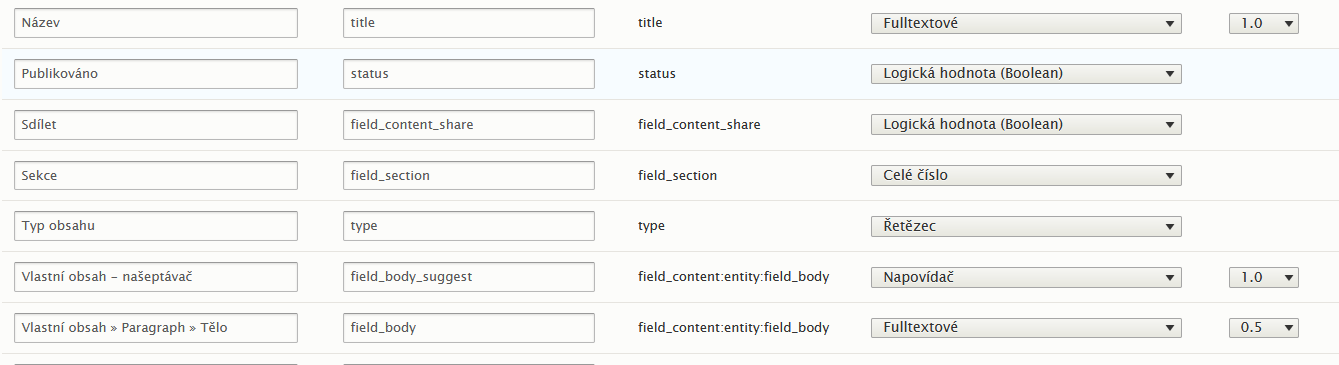
For a full-text index built with this module, you can define:
- Which content types (or other Drupal entities, such as taxonomy) are searched
- Which languages are searched
- Which fields are indexed and searched, and how (full-text, as a string, as a boolean and so on)
- Which processors are applied during indexing and searching
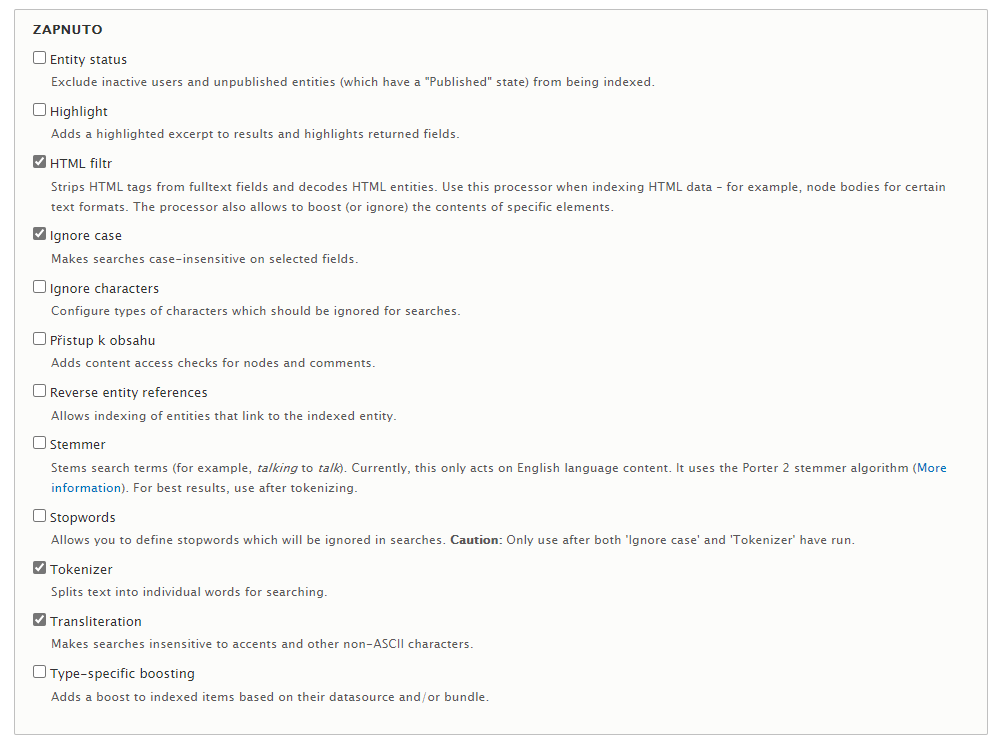
Most of the advanced capabilities come from these processors. There are many of them; the most interesting include:
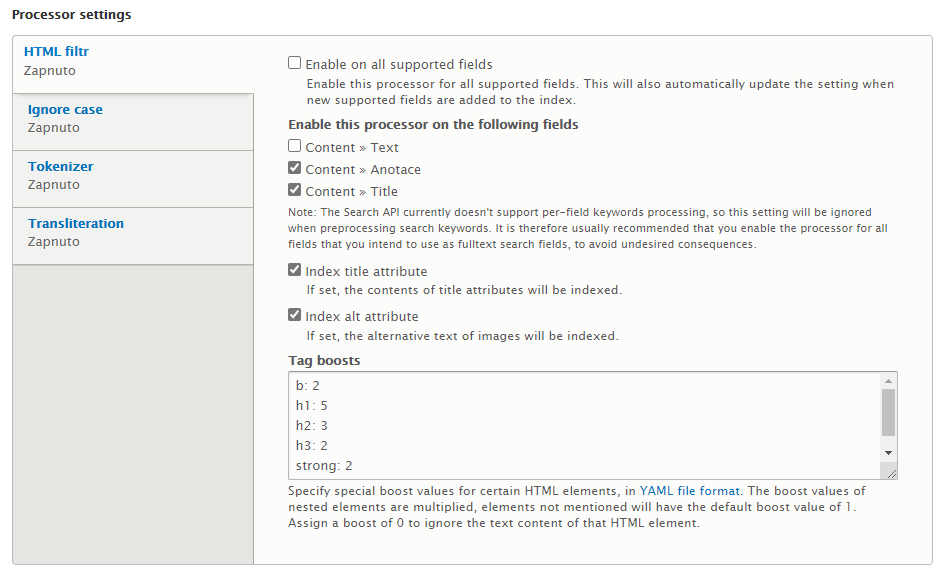
- Tokenizer: splits the indexed text into words. You can define word or phrase separators, the minimum length of an indexed word and so on.
- HTML filter: extracts the text from the HTML code. A useful option is to set weights for text inside individual HTML tags, so headings (H1, H2 and so on) count for more in search than ordinary paragraphs.
- Case insensitivity
- Transliteration, in other words handling of accents (when enabled, "č" is treated the same as "c" for search purposes)
- Ignored characters: you can specify which characters (by selection or with regular expressions) are ignored entirely during indexing
- Stopwords: a dictionary of words that are not indexed, typically conjunctions, prepositions and the like
- Stemmer: extracts word stems so that different forms of the same word can be found. Database Search, however, only supports an English dictionary here, so for Czech this option only helps on English-language websites.
Together with search pages built in Views, these features already give you good control over how searching works, how results are ranked (that is, how relevance to the search terms is evaluated) and how the search forms and results are presented.
A big advantage of this solution is that no additional application has to be installed; it uses only Drupal and its modules. The main drawbacks are:
- no way to find similar words by their stems (stemming)
- only database content is searched, so attachments such as PDFs cannot be searched
- no way to fine-tune how result relevance is evaluated
Search with Search API and Apache SOLR
If you need even more advanced search than Search API with Database Search can offer, the most common choice is Apache SOLR (https://solr.apache.org).
SOLR is a standalone application built for full-text search. It has to be fed the data to index: it provides an interface to which the data to be searched is sent programmatically. It then indexes that data in a defined way and stores it in its own data structures optimized for searching. During indexing, SOLR again uses several types of processors that shape how the index is built; in SOLR terminology these are analyzers, tokenizers and filters. They handle word recognition, HTML tag filtering, word stem recognition, upper and lower case, accents and so on.
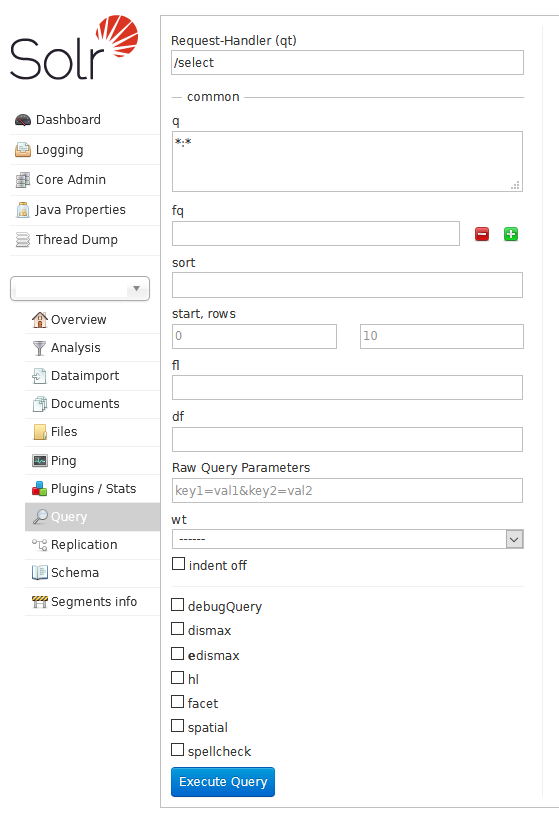
For searching, SOLR provides a query interface. Full-text queries and their options are sent to it as parameters, and it returns a list of results in a structured format (XML, JSON and so on).
SOLR also has an interface for extracting text from document formats (PDF, Microsoft Office formats and others, see http://tika.apache.org/1.24.1/formats.html), so documents uploaded to Drupal can be searched as well.
Integration with Drupal is handled by the Search API and Search API SOLR modules. The configuration options are essentially the same as with Database Search: the content types to index, the indexed fields and their properties, the processors and so on are all defined in Drupal. The difference is that the integration module sends data to SOLR for indexing and, when someone searches, builds a query to SOLR, reads the results back, formats them and displays them on the search page.
Compared with Search API and Database Search, this adds several important capabilities:
- support for stemming (including for Czech), so different forms of the same word are found by their stems
- support for searching attachments such as PDFs
- detailed control over relevance ranking: weights by content structure (for example, a heading counts for more than body text), by HTML tag (H2 counts for more than an ordinary paragraph), by other metadata (if two documents are about equally relevant, the newer one or one in a particular category ranks higher) and so on
- the ability to build synonym dictionaries (and, of course, stopword lists and the like)
You can also put more work into how search is presented. For example, you can build faceted search (results are grouped into categories that users can use to narrow the results interactively), add autocomplete suggestions, use a "More Like This" feature (finding documents similar to the one currently selected) and so on. This makes it a very powerful search tool that can deliver high-quality full-text search in Czech, even for very large websites.
Search with Search API and Elasticsearch Connector
Elasticsearch is another open-source search tool that works on similar principles to Apache SOLR and uses the same Apache Lucene full-text engine.
As with SOLR, there is a contributed Search API module for Elasticsearch, called Elasticsearch Connector. The details differ: with Apache SOLR, the index structure is configured directly in SOLR, whereas Elasticsearch is controlled entirely from outside through a REST API, including the index structure definitions. The principles, however, are the same, and so are the resulting capabilities. The bigger practical difference is that Drupal with SOLR is used far more often than Drupal with Elasticsearch, so an Elasticsearch implementation is more likely to run into problems or bugs in the integration modules.
Conclusion
Site search deserves proper attention when a project is being planned. It is always important to weigh the goals, meaning the capabilities and quality of the search, and choose the right tools and the right amount of effort to match. As this article shows, there are several options (and not all of them are covered here; you could, for example, use Google Custom Search Engine to search a site). They differ in capabilities and quality as well as in the effort they require, that is, in cost and in the expertise needed. Choosing the right search option should always be part of planning a website.
Useful links:
https://www.drupal.org/project/search_api
https://www.drupal.org/project/search_api_solr
https://www.drupal.org/project/elasticsearch_connector
https://solr.apache.org/guide/8_8/
https://www.elastic.co/guide/en/elasticsearch/reference/current/index.html